
SYSTEM NFO’s
- Fresh minimal install of CentOS Linux 7.6.1810
- Webmin version 1.90
- ConfigServer Security & Firewall 12.1
- MariaDB default webmin/virtualmin install
- LAMP
- Phpmyadmin
I ran into problem trying to import a large database on a fresh CENTOS 7 test lab! After setting up value in php.ini (I am running PHP version 7.0.27). I was still not able to import the database in phpmyadmin.
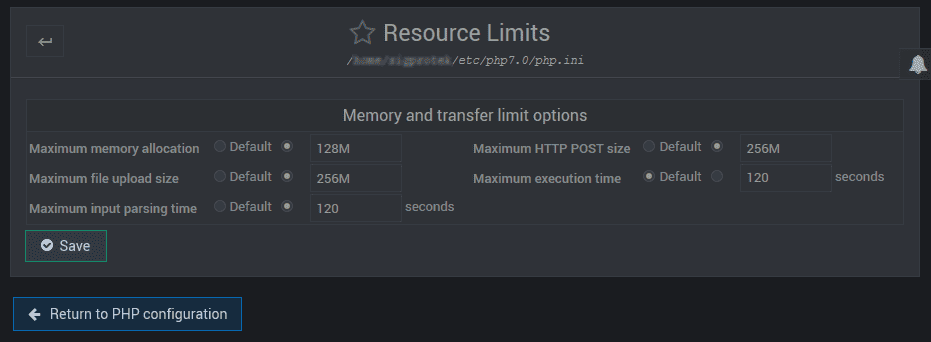
Notice the Maximum execution time is set to 120 seconds
Even after changing this value for 240-500, 700 seconds…
I am still having issue importing the database!
Here is the fix,… you need to go in Virtualmin
1. Select the virtual server
2. Navigate to -> Server Configuration -> Website Options
3. In Website and Php options navigate to Maximum Php script run time
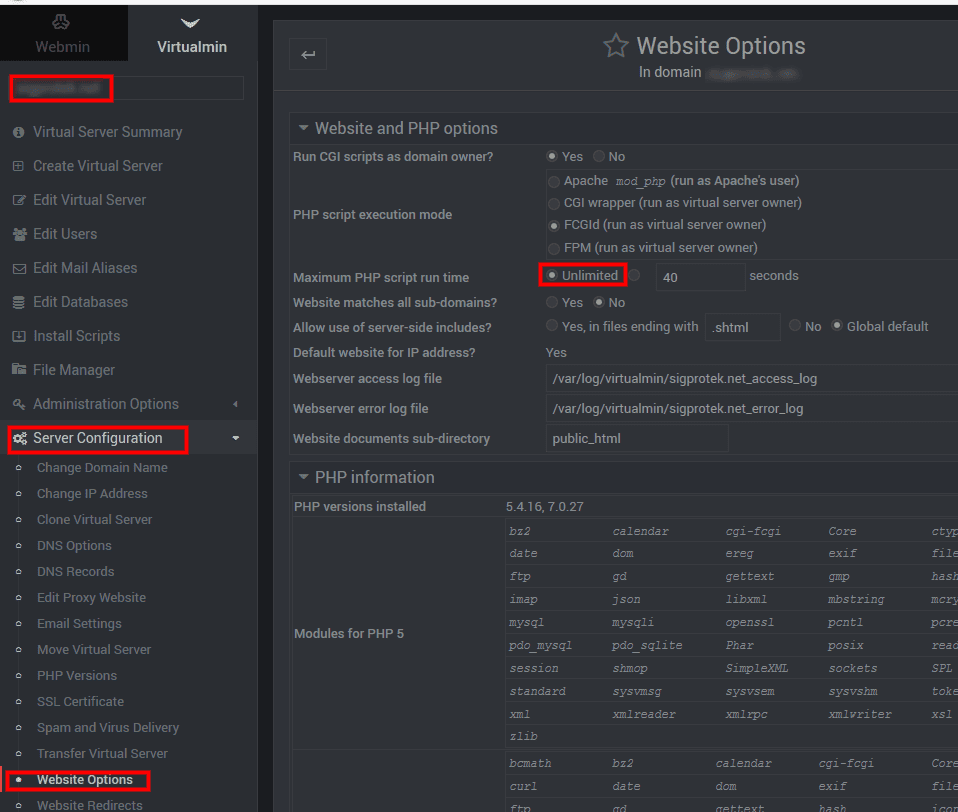
I checked “Unlimited” and hit “Save”
Voilà, I am able to import this large database without any errors!

For security reason I suggest that you put back the default value after your importation is finish!
Enjoy!